
Title page - Download - Background - Storyline - Gallery - Making of - Cast |
Script - Modeling - Animation - MaxScript - Rendering - Music - Video processing - Software - Hardware |
 As soon as the first 3D models were available we
could begin with some animation tests. The first tests consisted of moving objects along a
given path. This can be used to do camera movements or flying spaceships. In the first
version of the script there should have been a race through the campus where the alien
ships would have chased the robots in a spaceship of their own. This scenario was used for
test animations which didn't make it into the final movie because there wasn't enough time
left. Here you can view parts of the unpublished chasing scene: szene8.mpg
(1.5MB).
As soon as the first 3D models were available we
could begin with some animation tests. The first tests consisted of moving objects along a
given path. This can be used to do camera movements or flying spaceships. In the first
version of the script there should have been a race through the campus where the alien
ships would have chased the robots in a spaceship of their own. This scenario was used for
test animations which didn't make it into the final movie because there wasn't enough time
left. Here you can view parts of the unpublished chasing scene: szene8.mpg
(1.5MB).
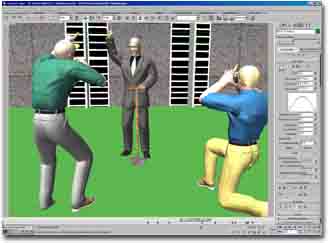
All the character animation (human figures as well as robots) was done with Character Studio, which is a plugin for 3D Studio MAX and consists of two parts: Biped and Physique. Biped provides the animator with a ready made skeleton of a biped (hence the name of the plugin). This skeleton can be animated in several ways, for example, with motion captured movements, with foot steps or manually with inverse or forward kinematics and key framing. Once you have created the desired animation this movement has to be applied to your actual character. This can either be accomplished by assigning each limb of your character to the appropriate limb of the biped so that the character does the same movement than the biped (which was done in the case of the robots). Or it can be done with the second part of Character Studio: Physique. Physique's job is to connect a mesh (consisting of triangles, for example) with a biped. This can be seen as if the mesh gets "thrown over" the biped. The mesh follows the movement of the biped without suffering from any cracks (for example, at the joints). The process of connecting the mesh with the biped is a rather time-consuming task however.
 Bipeds |
 Meshes |